Outbound Tech Stack for Startups: Complete 2026 Playbook
Build an outbound tech stack for startups in 2026 with six layers, budget benchmarks, tool picks, and deliverability tips. Get the playbook.
TL;DR
An outbound tech stack is the set of software tools a startup uses to find prospects, reach them through cold email, LinkedIn, and phone, and manage the resulting pipeline. The stack has six functional layers: data and enrichment, email infrastructure, sequencing, CRM, signals and intent, and calling. Budget ranges from under $500/month at the pre-seed stage to $8,000+ at Series B. The critical insight most guides skip: tools without a skilled operator, proper deliverability setup, and clear messaging produce nothing.
If you’d rather skip the learning curve, SalesPipe can help with outbound infrastructure, messaging, and execution.
What is an outbound tech stack for startups?
An outbound tech stack is the combination of tools used to find prospects, verify contact data, send cold outreach (email, LinkedIn, phone), and manage pipeline in a CRM. It typically includes six layers: data and enrichment, email infrastructure, sequencing tools, CRM, intent signals, and calling software. Most startups spend between $500 and $8,000+ per month depending on stage, but results depend more on setup quality, deliverability, and messaging than on the tools themselves.
What Is an Outbound Tech Stack?
An outbound tech stack for startups is the combined set of software tools and platforms used to identify, reach, and engage prospects through outbound channels like cold email, LinkedIn, and cold calling. It’s not a single product. It’s a system of interconnected layers, each handling a different part of the outbound motion.
Think of it like a kitchen. A knife alone doesn’t make dinner. You need a stove, cutting board, pans, and ingredients, all used by someone who knows how to cook. The same logic applies here. A B2B startup sales tech stack refers to a carefully chosen set of tools designed to support and accelerate outbound sales, but the stack is infrastructure. Without strategy, targeting, and messaging, it’s just cost.
This glossary breaks down each layer of the outbound tech stack for startups, defines the terms you’ll encounter while building one, gives honest cost benchmarks by startup stage, and explains why tools alone don’t generate pipeline.
Why startups need an outbound tech stack
Startups use an outbound tech stack to systematically generate sales opportunities without relying on inbound leads. It allows small teams to scale outreach across email, LinkedIn, and phone while tracking performance in a CRM. A well-built stack improves lead quality, increases reply rates, and ensures emails reach inboxes instead of spam folders.
Outbound Tech Stack Layers at a Glance (Quick Summary Table)
This table improves skimmability and wins featured snippets.
| Layer | Purpose | Example Tools | Typical Cost |
|---|---|---|---|
| Data & Enrichment | Find verified contacts and company data | Apollo, ZoomInfo, Clay | $0–$500+ |
| Email Infrastructure | Ensure emails land in inbox | Google Workspace, Mailreach | $50–$200 |
| Sequencing | Automate outreach campaigns | Instantly, Smartlead, Lemlist | $30–$200 |
| CRM | Track leads and pipeline | HubSpot, Attio, Pipedrive | $0–$100+ |
| Intent Signals | Detect buying intent | Bombora, UserGems | $100–$1,000+ |
| Calling | Cold/warm calling tools | Orum, Aircall | $50–$300/seat |
The Six Layers of an Outbound Tech Stack
The most useful way to think about an outbound tech stack is in functional layers. Each layer solves a specific problem. Skip one, and the whole system underperforms.
How Outbound Tech Stack Components Work Together
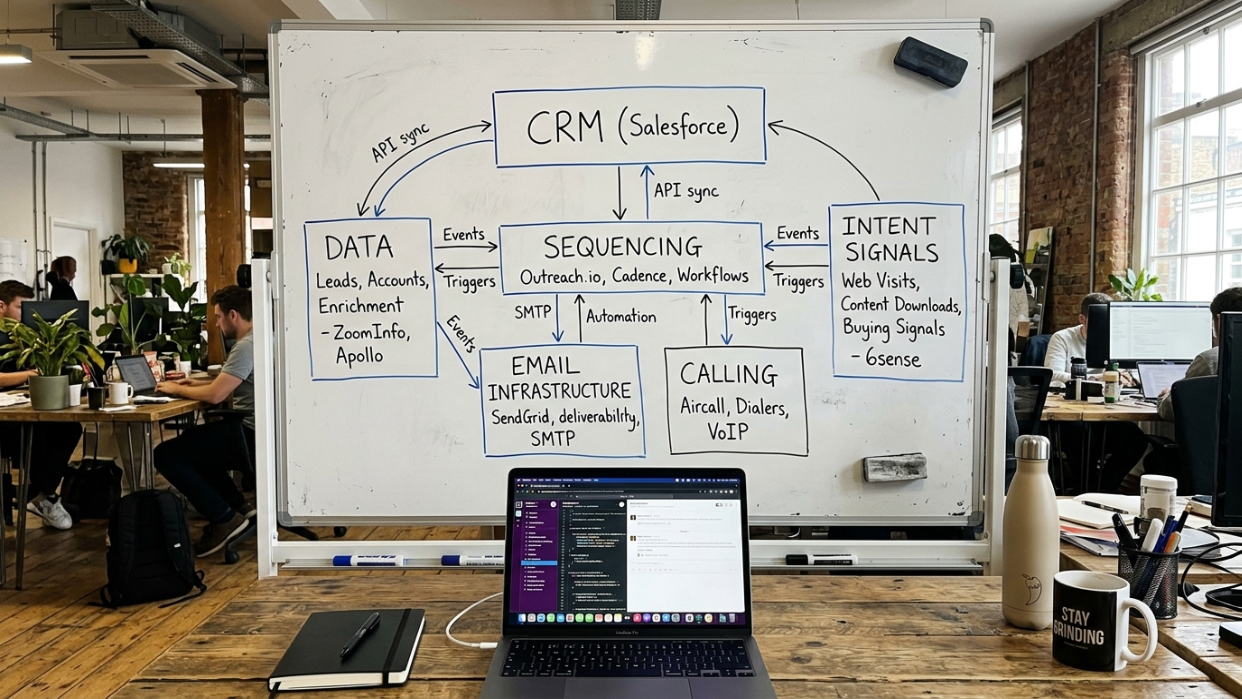
An outbound tech stack only works when all layers are connected into a single workflow. Data tools feed verified contacts into sequencing tools, sequencing tools execute outreach, deliverability infrastructure ensures inbox placement, and the CRM tracks responses and deals. Intent signals and calling tools then prioritize and convert high-value prospects.
Without integration between these layers, startups often end up with fragmented systems where data does not sync, outreach is inconsistent, and pipeline visibility is lost.
This framework draws from what’s working in practice right now. The structure below (data, email infrastructure, sequencing, CRM, signals, calling) reflects how experienced outbound operators actually organize their tools.
Layer 1: Data and Enrichment
What it does: Provides contact data (emails, phone numbers, job titles) and company intelligence (revenue, headcount, tech stack, funding history).
Why startups need it: You can’t email someone you can’t find. Data accuracy directly affects reply rates. Bad data means bounced emails, wasted sequences, and damaged sender reputation.
Example tools: Apollo, ZoomInfo, Clay, Clearbit, Kaspr
Typical cost range: Free (Apollo’s starter tier) to $500+/month for premium data providers
Clay has become a standout in this layer because it connects to over 150 data providers through waterfall enrichment, running a contact through multiple sources in sequence to maximize the fill rate. Practitioners on Reddit’s r/coldemail community frequently name Clay as the go-to enrichment tool, even for solo founders. If you want to go deeper on this category, our guide to lead prospecting tools covers evaluation criteria in detail.
What to watch for: Sticker price on data tools is misleading. The real question is data accuracy. A $99/month tool with 40% email accuracy will cost you more in bounced sends and domain damage than a $300/month tool with 95% accuracy.
Layer 2: Email Infrastructure
What it does: The technical foundation that allows you to send cold emails at scale. This includes domains, mailboxes, warming tools, and DNS configuration (SPF, DKIM, DMARC records).
Why startups need it: This is where most startups fail silently. You can write the perfect email, target the right people, and use the best sequencing tool, but if your infrastructure is broken, everything lands in spam. Scaling outbound without protecting deliverability is a fast way to burn domains.
Example tools: Google Workspace, Microsoft 365, Instantly (warmup feature), Mailreach
Typical cost range: $50 to $200/month for domains and mailboxes, plus warming tools
What to watch for: New domains need 2 to 4 weeks of warming before you can send at volume. Most founders underestimate this. You also need multiple sending domains (not your primary company domain) and inbox rotation to spread volume safely. Skipping this setup is one of the most common cold emailing mistakes startups make.
This layer is where expert setup matters far more than tool choice. Two people can use the exact same tools and get wildly different inbox placement rates based on how they configure DNS, warming schedules, and sending patterns.
Layer 3: Sequencing and Outreach
What it does: Automates multi-step outreach campaigns across email and LinkedIn. A sequence might look like: email 1, wait 3 days, email 2, wait 2 days, LinkedIn connection request, wait 4 days, email 3.
Why startups need it: Manual follow-up doesn’t scale. Research consistently shows that most replies come on the second or third touch, not the first. Sequences keep prospects in motion without requiring someone to manually track every thread.
Example tools: Instantly, Smartlead, Lemlist, Woodpecker, Apollo (built-in sequencer)
Typical cost range: $30 to $200/month depending on features and sending volume
Understanding what an email sequence is and how to structure one matters more than which tool you pick. The tool is the vehicle. The sequence design (timing, messaging, personalization) is the driving.
For startups running multi-channel campaigns that include LinkedIn alongside email, our LinkedIn prospecting guide covers practical tactics.
Layer 4: CRM
What it does: The system of record where leads, deals, conversations, and pipeline stages are tracked. It’s your single source of truth for what’s happening in your sales process.
Why startups need it: Many founders skip CRM early and regret it once they’re drowning in spreadsheets. Even a basic CRM prevents leads from falling through cracks and gives you data to understand what’s working.
Example tools: HubSpot (free tier), Attio, Pipedrive, Close, Breakcold
Typical cost range: Free (HubSpot) to $100+/month for paid tiers
HubSpot remains the most popular CRM for startups, largely because its free version offers comprehensive tools for contact management, email tracking, and sales pipelines. For pre-seed teams, the free tier is genuinely sufficient. You can upgrade later when deal volume demands it.
What to watch for: CRM only works if people actually use it. Pick the simplest tool your team will adopt consistently, not the one with the most features.
Layer 5: Signals and Intent

What it does: Detects when a prospect or account shows buying signals. These might include job changes, funding rounds, technology installs, website visits, or engagement with competitor content.
Why startups need it: Outbound works dramatically better when you reach prospects at the right moment. Emailing a VP of Sales the week they start a new role is a different conversation than cold-emailing someone who’s been in-seat for three years. Timing changes everything.
Example tools: Bombora, G2 Buyer Intent, UserGems, Clay (with enrichment triggers), LinkedIn Sales Navigator alerts
Typical cost range: $100 to $1,000+/month (this layer gets expensive fast)
What to watch for: Intent data is powerful but noisy. Not every signal means a prospect is ready to buy. The value comes from combining signals with good ICP definition, not from acting on every alert.
Layer 6: Calling
What it does: Dialers and phone tools for cold calls, warm calls, and follow-up calls. Modern dialers offer parallel dialing (calling multiple numbers simultaneously), call recording, and CRM integration.
Why startups need it: Phone remains the highest-conversion outbound channel for certain segments, particularly mid-market and enterprise prospects. It’s also the fastest way to qualify or disqualify a lead.
Example tools: Orum, Nooks, PhoneBurner, Aircall
Typical cost range: $50 to $300/month per seat
What to watch for: Cold calling works best as part of a multi-channel sequence, not in isolation. The phone call that follows a well-timed email gets answered more often than a purely cold dial.
Budget Tiers by Startup Stage
One of the biggest questions founders ask about an outbound tech stack for startups is simple: what will this actually cost me? Sticker prices on individual tools are misleading because a working outbound motion requires multiple layers. Here’s what realistic total spend looks like at each stage.
| Stage | Monthly Budget | What You Can Realistically Run |
|---|---|---|
| Pre-seed / Solo founder | Under $500/mo | Apollo free tier + Instantly + Google Workspace. Two to three tools max. |
| Seed / Small team (2-5 people) | $500 to $1,500/mo | Paid data provider + sequencer + CRM + warming tools |
| Series A | $1,500 to $4,000/mo | Multi-channel stack + intent data + dedicated email infrastructure + dialer |
| Series B+ | $8,000+/mo | Full-stack platform or best-of-breed tools across all six layers |
These benchmarks come from practitioner-shared frameworks across outbound communities and align with published pricing from tools like Apollo (Launch plans at roughly $167 to $185/month, Growth at $446 to $495/month) and Amplemarket (starting around $300/user/month on Startup plans).
The Reddit consensus on r/coldemail is worth noting here: for solo founders, the minimum viable outbound stack is Clay for enrichment and Instantly for sending. Two tools, not ten. That combination can run under $500/month and still produce meetings if the targeting and messaging are right.
Common Outbound Terms You’ll Encounter
Building an outbound tech stack for startups means swimming in acronyms and jargon. Here’s a plain-language glossary of the terms that come up most often.
ICP (Ideal Customer Profile): A description of the type of company and buyer most likely to purchase your product. Defined by attributes like industry, company size, role, and pain points. Every tool decision downstream flows from this.
Deliverability: Whether your emails actually reach the prospect’s inbox, as opposed to landing in spam, promotions, or getting blocked entirely. High deliverability is the foundation everything else sits on.
Domain warming: The process of gradually increasing send volume on a new email domain to build sender reputation with email providers. Typically takes 2 to 4 weeks. Skipping it is the fastest way to get blacklisted.
Waterfall enrichment: Running a contact record through multiple data providers in sequence, so if Provider A doesn’t have the email, Provider B gets a shot, then Provider C. Clay popularized this approach.
Sequencing: Automated multi-step outreach where emails, LinkedIn messages, and calls are scheduled in a predefined order with timed delays between each step.
Inbox rotation: Spreading outbound email sends across multiple mailboxes to reduce the volume per mailbox and protect deliverability. If one mailbox gets flagged, the others keep running.
Bounce rate: The percentage of emails that fail to deliver. A bounce rate above 3% signals data quality or infrastructure problems and puts your domain at risk.
Multi-channel outreach: Coordinating email, LinkedIn, and phone outreach in a single campaign. For a deeper look at multi-channel strategy, our cold outreach guide covers this in detail.
SDR (Sales Development Representative): The person (or increasingly, an AI agent) responsible for running outbound day to day, including prospecting, sending outreach, and booking meetings. Learn more about what an outbound SDR does and how the role is evolving.
Outbound operator: A senior practitioner who owns the entire outbound system, from strategy and ICP definition through tool configuration, messaging, execution, and ongoing optimization. This is distinct from a junior SDR. An outbound operator is closer to a fractional VP of Sales Development.
GTM (Go-to-Market): The overall strategy for how a company brings its product to customers. Outbound is one GTM channel.
The Tool Trap: Why the Stack Isn’t the Strategy
Here’s what every tool-list article in search results won’t tell you: the outbound tech stack for startups is necessary infrastructure, but it is not the strategy itself. Buying tools without configuring them properly (domains, warming, ICP, messaging) wastes money. It’s like buying a gym membership and expecting to get fit without working out.
The total cost of ownership for outbound tools goes well beyond sticker prices. A working outbound motion requires data, sending infrastructure, deliverability protection, signals, social automation, and CRM integration. The price tag on any single layer understates the real cost. Enterprise outbound teams juggle an average of eight tools to close deals. For startups, that number should be lower, but the integration overhead is still real.
There’s a growing trend toward tool consolidation. Apollo, for example, cites case studies where companies achieved 64% lower tech stack costs by consolidating multiple tools into one platform. Amplemarket reports similar numbers, with one customer cutting tooling costs by 56% after consolidation. The goal is fewer tools, better data, and stronger pipeline outcomes.
But even the leanest stack requires someone who knows what they’re doing. This is what practitioners call the “operator gap.” Every ranking page in search results assumes you’ll buy tools and magically get meetings. None address the reality that tools without a skilled operator produce nothing. You need someone who can define your ICP, write messaging that resonates, configure deliverability properly, interpret response data, and iterate weekly. For more on cold email structure and what actually gets replies, that’s worth reading separately.
AI is changing this equation. Tools like Clay use AI-powered research across 150+ data sources to enable personalization at scale, collapsing what used to require three or four separate tools into one. But AI doesn’t eliminate the need for judgment. Someone still needs to decide who to target, what to say, and when to change course.
If building and operating a full outbound stack isn’t where you want to spend your time, an outbound partner can handle infrastructure, messaging, and execution so you can focus on closing deals.
Talk to SalesPipe about outbound execution →
How to Evaluate Outbound Tools: A Decision Framework
Before you buy anything, run each tool through this checklist. The tools you pick should match the way your team sells, not force you into a setup that doesn’t fit.
Integration: Does it connect to your CRM? If data doesn’t flow between tools automatically, you’ll spend hours on manual entry.
Scalability: Can you start on a free or low-cost tier and scale up? Avoid tools that require annual contracts and large upfront commitments before you’ve validated that outbound works for your market.
Deliverability: Does the tool handle deliverability natively, or do you need additional warming and monitoring tools on top? This hidden cost catches many startups off guard.
Total cost across layers: What’s the real monthly spend when you add all required layers? A $50/month sequencer means nothing if you also need $300/month for data, $100/month for warming, and $50/month for extra mailboxes.
Fit for your stage: A solo founder doesn’t need Salesforce. A Series B team probably shouldn’t be running everything out of a Google Sheet. Match tool complexity to team size.
Ongoing review: Your sales enablement tools should never be static. Build a regular review cycle, quarterly at minimum, to evaluate whether tools keep pace with your evolving needs. Collect feedback from whoever runs the stack daily.
AI’s Impact on the Outbound Tech Stack in 2026
AI is compressing the outbound tech stack for startups in real time. What used to require separate tools for data enrichment, personalization, research, and even initial copywriting is increasingly handled by platforms that combine these functions.
Clay is the clearest example. Instead of manually researching each prospect, Clay pulls data from 150+ providers, enriches records automatically, and enables hyper-personalized outreach at scale. This is why the r/coldemail community has converged on Clay + Instantly as the minimum viable stack. Two tools handling what used to take five or six.
AI-powered outbound also raises a question that matters for startups: do you still need a traditional SDR, or can a single operator with AI tools produce equivalent output? The answer, increasingly, is that one experienced operator with the right AI stack can match or exceed what a small SDR team produced two years ago. The role isn’t disappearing. It’s evolving into something that looks more like an outbound operator than a manual email sender.
This shift favors startups. Smaller teams with less budget can now compete on outbound sophistication with much larger companies, provided they pick the right tools and have someone who knows how to use them.
Putting It All Together
Building an outbound tech stack for startups doesn’t have to be overwhelming. Start with the layer that matters most for your current stage, typically data and email infrastructure, and add layers as your outbound motion matures. Resist the temptation to buy everything at once. Two well-configured tools will outperform eight poorly configured ones every time.
The framework is straightforward. Define your ICP first. Get your email infrastructure right. Pick a sequencer. Add a CRM before you’re drowning. Layer in signals and calling as volume grows. And most importantly, make sure someone qualified is actually operating the system.